Buying a phone without checking the IMEI and warranty is risky. You can end up with a stolen, blacklisted, or counterfeit device that won’t connect to networks or be serviced.
Warranties can be void, non-transferable, or limited to specific regions, leaving you with costly repairs. Hidden faults or mismatched serials are common when sellers hide issues.
This article shows quick, reliable steps to decode an IMEI, run fast checks with trusted tools, and confirm seller warranty and transfer rules. You’ll also get red flags, scripts to use during negotiation, a pre-purchase checklist, and immediate post-purchase actions if something’s wrong.
Follow these simple minutes-long checks to buy with confidence and avoid surprises today safely.
Editor's Choice
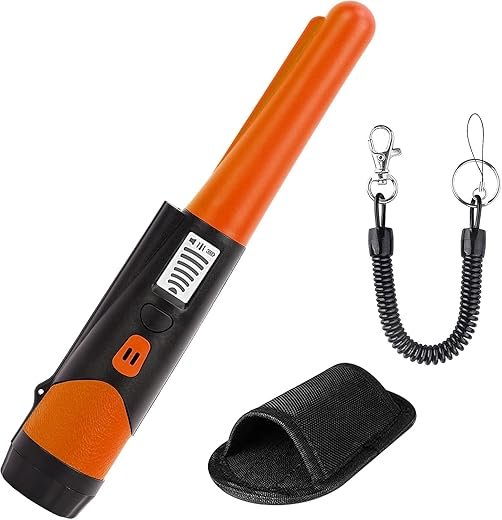
Serplex High-Sensitivity Handheld Metal Detector with LCD
360° waterproof pinpointer for coins and jewelry
A durable handheld metal detector that quickly locates small metal items like coins and jewelry. Its 360-degree probe, easy-to-read LCD, and waterproof design make it reliable for beach, field, and indoor searches.
The IMEI (International Mobile Equipment Identity) is a unique numeric identifier assigned to the cellular radio module inside every phone. Think of it as the device’s network fingerprint — carriers, law enforcement, and some warranty systems use it to track a specific handset on mobile networks. Unlike a phone’s serial number, the IMEI is tied to the modem and network identity, not the full manufacturing record.
IMEI vs serial number — quick clarity
IMEI: 15-digit code used by carriers to identify the mobile unit on GSM/4G/5G networks; important for locks and blacklists.
Serial number: manufacturer-specific identifier that identifies the physical unit for repairs and internal tracking; used by Apple, Samsung, etc., for warranty and repair history.
Both matter, but for checking stolen/blacklist status and carrier locking, IMEI is the one to check first.
What an IMEI lookup can reveal
A quick IMEI check can tell you:
Exact device model and sometimes model variant (e.g., iPhone 12 vs iPhone 12 Pro)
Country or region of original sale (helps detect grey imports)
Carrier lock status (locked to AT&T, Vodafone, etc.)
Blacklist/stolen status (reported lost, stolen, or blocked)
Warranty window or purchase date (when providers expose this info)
If the IMEI is invalid or formatted oddly (a giveaway for counterfeits)
Real-world example: a buyer found a “cheap” Galaxy S21 whose IMEI showed it was a UK carrier-locked unit — useful before purchase to avoid incompatible service.
Locate the IMEI fast — places to check
Dial code: enter *#06# (instant display)
Settings: Settings > About phone (Android) or Settings > General > About (iPhone)
Physical: printed on the original box barcode, SIM tray, or under removable battery
Paperwork: invoice, seller listing, or emailed receipt
Why matching IMEIs matters
Always confirm the IMEI on the device matches the one on the box and the seller’s invoice. Mismatches can mean swapped logic boards, refurbished parts, or fraud. Tip: take photos/screenshots of all three before paying — they’re your proof if things go wrong.
Next up: quick tools and step-by-step methods you can use to check an IMEI in minutes.
2
Fast IMEI checks: tools and step-by-step methods
Manufacturer warranty / coverage pages
Many brands let you check eligibility or service status using an IMEI or serial number.
Step: Get IMEI from *#06# or Settings > About.
Step: Visit the maker’s check page (Apple’s Coverage, Samsung’s support lookup, Google device warranty pages). Enter IMEI or serial.
What to expect: a quick readout like “Valid,” days of coverage left, or “No coverage.” If the site asks for a serial instead of IMEI, use the phone’s serial — it’s okay to have both on hand.
Real-world note: a buyer once noticed a phone listed as out-of-warranty on Apple’s page and used that to negotiate a lower price for a “like-new” iPhone.
Carrier & national blacklist checks
Carriers and national registries record phones reported lost or stolen.
Step: Use national checkers first (e.g., CTIA Stolen Phone Checker in the US, paid services like CheckMEND in some countries) or your local regulator’s site.
Step: Enter IMEI; check “blacklisted”, “clear”, or similar status.
What to expect: “Blocked/Reported Lost” = don’t buy. “Clean” or “Not reported” = better, but not 100% guaranteed.
Reputable third‑party IMEI services
Paid services aggregate carrier and GSMA data and are more reliable than random free sites.
Examples: CheckMEND, Swappa’s IMEI checks, and carrier-assisted checks.
Step: Use a paid check for high-value buys; save the report as proof.
Interpreting results (quick guide)
Clean/Green: not reported stolen, no obvious carrier flag. Good sign.
Flagged/Red: lost/stolen/blocked—stop the purchase.
Carrier-locked: shows the carrier name and “locked” — ask about unlock eligibility.
Warranty indicators: “Active” with days left = transferable in many cases; “Expired” = no manufacturer coverage.
Watch out for scammy or partial-info sites
Free sites often show only basic model data or outdated flags.
Don’t give payment or personal info to unknown sites to see results.
Avoid “guaranteed clean” claims without a verifiable report number.
At-the-table smartphone checks
Bring a portable hotspot and your own SIM.
Ask for the phone, confirm IMEI matches box/invoice, open the maker’s coverage page, take screenshots, or run a quick carrier lookup.
If unsure, call the carrier’s support on speaker and request an IMEI status check.
Next you’ll learn how to verify seller warranty details and whether coverage is transferable before you finalize the deal.
3
Verify seller warranty: how to confirm coverage and transferability
What to ask the seller (quick checklist)
Before you pay, request these documents and details:
Original receipt, invoice or proof of purchase with date and retailer name.
Warranty card or digital registration confirmation.
Any extended-warranty or insurance policy number and provider contact.
A buyer once walked away from a “like-new” Galaxy S21 because the seller only had a photocopy of a receipt and no serial on record — don’t be that buyer.
Check manufacturer records with IMEI/serial
Use the device serial or IMEI to confirm official warranty status:
Ask the seller to unlock and show Settings > About (serial & IMEI) or the original box.
Call or use the maker’s warranty lookup page and give the IMEI/serial to verify start date, remaining days, and registration name.
Request a screenshot or email confirmation from manufacturer support. If online lookup shows “Active — X days,” save that page or take a timestamped photo.
Premium Protection
Acko One-Year Screen Protection Plan Rs 70,001-100,000
Covers accidental screen damage for high-end phones
One-year email-delivered plan covering accidental screen damage for phones priced between Rs 70,001 and Rs 100,000. The plan auto-activates when purchased with a phone on Amazon and offers simple online claim filing; exclusions apply.
Ask for the plan number, activation/expiry dates and the policy PDF.
Call the insurer or plan provider with the plan number and IMEI to confirm coverage, claim limits, and whether transfer is allowed.
Check if the plan required registration by the original buyer; some plans become void if not registered within a window after purchase.
Verify authorized‑reseller status
Warranty claims can be voided if sold through unauthorized channels:
Search the manufacturer site for an “authorized dealer” or “reseller locator.”
Match the retailer name and GST/Tax invoice to the brand’s list.
If the seller claims a store promo (e.g., bundled service), ask for written proof from the retailer.
How to contact support and what to ask
When you call or email manufacturer/retailer support, have IMEI/serial handy and ask:
“Can you confirm warranty start date and remaining days for IMEI X?”
“Is this warranty registered to the original buyer, and is it transferable?”
“Does this device have any service holds, prior repairs, or claim history?”
“Please send confirmation to this email or provide a reference number.”
Ask for written confirmation (email or screenshot). That proof is your strongest leverage if a problem appears later.
Next up: spot red flags, use negotiation scripts, and run a concise pre-purchase checklist so you don’t miss anything at the table.
4
Red flags, negotiation scripts and a pre-purchase checklist
Common red flags to watch for
IMEI on Settings, box and seller photo don’t match.
Missing original receipt, blank warranty card, or photocopied invoice.
Seller refuses a live IMEI check or to unlock Settings > About.
Price far below market (a 30–50% discount on a current iPhone is suspicious).
Device won’t hold charge, randomly reboots, or has visible water damage.
IMEI shows “stolen/blacklisted” or the carrier reports an unpaid balance.
Seller pressures for quick cash-only sale or asks to meet in isolated places.
A real example: a Samsung S20 priced like a used Moto G turned out to be carrier-locked with a fraud hold — the buyer walked away and saved a costly headache.
Quick scripts to use (copy-paste)
Request IMEI: “Can you open Settings > About and show me the IMEI on camera? Please also snap the IMEI on the box and the receipt.”
Ask for receipt photo: “Please send a photo of the original invoice showing date, retailer and serial/IMEI — blur any personal info.”
Ask for live demo: “Can we do a 5-minute live call so you can unlock the phone, show Settings, make a test call and check Wi‑Fi/Bluetooth?”
If evasive: “If you can’t do the live check, I can’t proceed. It’s standard for safety.”
Negotiation tactics tied to verification
IMEI mismatch or unclear history: ask for a 20–40% reduction or walk away.
Minor cosmetic damage but clean warranty: negotiate 10–15% off.
Battery drains or small faults: request repair credit or new battery cost deducted.
Stolen/blacklist result: refuse purchase and report listing.
If seller offers documentation after payment: insist on refund window or escrow — otherwise walk.
Safe payment & meeting practices
Prefer in-person with card reader, UPI/GPay with immediate confirmation, or PayPal Goods & Services for remote buys.
Avoid wire transfers, Western Union, or cash to unknown sellers.
Meet in busy public places (cafe, mall, police station safe exchange zone) and bring a friend.
Pre-purchase non-negotiable checklist
IMEI matches device, box and receipt.
Live IMEI check (shows not blacklisted) and warranty status verified.
Device boots, no unexpected resets, and seller signs out of accounts (iCloud/Google).
Agreed payment method, written receipt/bill of sale, and meeting in public place.
Next, we’ll cover immediate post-purchase checks and what to do if the device isn’t as promised.
5
After purchase: immediate checks and steps if something’s wrong
Do these checks within the first hour
Re-check the IMEI on the device (Settings > About), the box and the invoice — they must match.
Confirm the seller has signed out of iCloud/Google and that Activation Lock / Find My iPhone (or Android FRP) is disabled by trying a full restart and a factory-reset prompt.
Call, send a quick SMS and use mobile data on the device to confirm cellular provisioning and that the SIM registers to your network.
Test core features: front/rear cameras, speakers, microphone, Wi‑Fi, Bluetooth, fingerprint/Face ID, charging port, and sensors (gyro/proximity). Record quick short videos showing these tests.
Best Value
Acko One-Year Screen Protection Plan Rs 35,001-50,000
Best for mid-range smartphones
One-year plan that covers accidental screen damage for phones priced between Rs 35,001 and Rs 50,000, delivered and auto-activated via email when bought with a phone on Amazon. Claims can be filed online or through the Acko app, with standard exclusions.
Immediately check the manufacturer’s warranty portal with the IMEI/serial to ensure coverage or transferability (Apple, Samsung, Xiaomi all have online lookup tools).
If the seller claimed the warranty would be transferred, ask for proof (original invoice with seller name) and call manufacturer support to confirm transfer steps and timelines.
If the device is blacklisted, stolen or not as described
Contact the seller first: request a refund, return shipping label or repair credit. Use the exact negotiation scripts you used pre-purchase.
Open a dispute with the marketplace or payment provider right away (many platforms require filing within 7–30 days).
If IMEI shows “stolen” or carrier flags it, inform the carrier and file a police report with IMEI + invoice — a police FIR is often required to escalate or block the device.
For warranty denial, escalate to manufacturer support and keep a record of their response; consumer-protection claims often need that exchange.
Preserve evidence and follow timelines
Save: photos of IMEI/device condition, transaction receipts, chat logs, screenshots of warranty lookup and carrier responses, and timestamped test videos.
Typical timelines: file payment disputes within your payment provider’s window (PayPal/UPI/bank 7–180 days varies), marketplace returns usually 7–14 days. Act immediately — delays weaken remedies.
A quick real-world note: a buyer of a second-hand iPhone 11 who tested features on the spot found Find My still active; they refused the sale, opened a platform dispute with video proof, and recovered funds within a week.
Next, use the final checklist to make your next purchase confidently.
Final checklist: buy with confidence
Always verify the IMEI first, confirm warranty status and transferability, and insist on a seller’s proof of purchase. Use trusted online IMEI services, carrier/manufacturer verification, and the step-by-step checks in this guide before you hand over money. Use the supplied negotiation scripts and the pre-purchase checklist to protect your investment and set clear terms.
A few minutes of verification can save hundreds or thousands in headaches. If anything looks off, walk away or use the negotiation lines to get repairs, proof or a lower price. After purchase, run the immediate checks listed here and contact the manufacturer or your carrier if problems arise. Be patient, deliberate. Keep this checklist handy for every used-device purchase today.
This article was super practical — thanks! I loved the step-by-step IMEI check section, made it easy to follow when I inspected a second-hand phone last week.
Quick notes:
– The bit about verifying seller warranty transferability saved me from buying a lemon.
– I actually bought the Acko One-Year Screen Protection Plan (Rs 35,001-50,000) after reading — felt safer for not much money.
One tiny complain: a couple of links to the IMEI lookup tools were outdated. Otherwise solid 👍
Thanks for the feedback, Clara — glad the Acko tip helped! I’ll check those links and update any dead ones. Which IMEI tool did you use when you checked the phone?
Super helpful breakdown on decoding IMEI. I teach people how to buy refurbished phones and this article covers almost every pain point.
FYI for others: make sure you check the warranty transfer rules with the brand AND ask for a screenshot of the warranty status from the seller. Acko plans are easy to buy, but manufacturer warranty is still king for hardware faults.
Also, the pre-purchase checklist in the article is something I print and bring to meetups — use it! (saved a friend from a busted mic last month)
@Sofia sure — I usually print the article’s checklist and add a quick column for “seller proof” (screenshot/receipt). Happy to DM a template if folks want.)
Thanks Priya — great tip about asking for a screenshot. If anyone wants, I can add a short sample message you can send to sellers asking for warranty screenshots.
Good read, but I gotta say: the metal detector mention makes me imagine phone buyers turning into airport security guards 😂
On a serious note, red flags section was solid — shady return windows and weird IMEI mismatches stood out. However, the article could use more on seller reputations (local marketplace scores, past complaints) and how to safely meet in person.
Also, anyone tried the Serplex device in the field? Curious if it’s practical or just a gadget for influencers.
Haha @Owen same here — felt like I needed a uniform. But seriously, meeting at a bank parking lot or police station is the best move. Vendor rating screenshots help too.
@Maya good note — I’ll include a quick pros/cons panel for the Serplex and similar detectors. Practical for some buyers (checking tampering), overkill for others.
Thanks Owen — noted on the seller reputation expansion, that’s a great idea. We’ll add a short guide on checking marketplace histories and safe meetup spots (police stations, cafe areas, etc.).
@Owen I actually used a cheap handheld metal tester (not Serplex) to check if a phone had been opened/modified — it was more of a “hunch” tool, not definitive. The Serplex looks legit from reviews though.







This article was super practical — thanks! I loved the step-by-step IMEI check section, made it easy to follow when I inspected a second-hand phone last week.
Quick notes:
– The bit about verifying seller warranty transferability saved me from buying a lemon.
– I actually bought the Acko One-Year Screen Protection Plan (Rs 35,001-50,000) after reading — felt safer for not much money.
One tiny complain: a couple of links to the IMEI lookup tools were outdated. Otherwise solid 👍
@admin I used IMEI24 — it was fast but didn’t show carrier lock info, so I cross-checked with the carrier’s site. @Evan yep, exactly!
I use IMEI.info most of the time — quick and usually accurate. Also, good call on the protection plan; beats a surprise repair bill.
Thanks for the feedback, Clara — glad the Acko tip helped! I’ll check those links and update any dead ones. Which IMEI tool did you use when you checked the phone?
Super helpful breakdown on decoding IMEI. I teach people how to buy refurbished phones and this article covers almost every pain point.
FYI for others: make sure you check the warranty transfer rules with the brand AND ask for a screenshot of the warranty status from the seller. Acko plans are easy to buy, but manufacturer warranty is still king for hardware faults.
Also, the pre-purchase checklist in the article is something I print and bring to meetups — use it! (saved a friend from a busted mic last month)
@Sofia sure — I usually print the article’s checklist and add a quick column for “seller proof” (screenshot/receipt). Happy to DM a template if folks want.)
@Priya omg that checklist idea is genius. Would you share your printable version? I hate trying to remember everything when I’m meeting sellers IRL.
Thanks Priya — great tip about asking for a screenshot. If anyone wants, I can add a short sample message you can send to sellers asking for warranty screenshots.
@Sofia I’ll put a downloadable checklist in the article update — thanks for the nudge!
Good read, but I gotta say: the metal detector mention makes me imagine phone buyers turning into airport security guards 😂
On a serious note, red flags section was solid — shady return windows and weird IMEI mismatches stood out. However, the article could use more on seller reputations (local marketplace scores, past complaints) and how to safely meet in person.
Also, anyone tried the Serplex device in the field? Curious if it’s practical or just a gadget for influencers.
Thanks for the safe meetup ideas, everyone. Also, adding marketplace complaint checks would be gold — please do include that, admin.
Haha @Owen same here — felt like I needed a uniform. But seriously, meeting at a bank parking lot or police station is the best move. Vendor rating screenshots help too.
If anyone wants links to tools that archive seller reviews, I can paste them here.
@Maya good note — I’ll include a quick pros/cons panel for the Serplex and similar detectors. Practical for some buyers (checking tampering), overkill for others.
Thanks Owen — noted on the seller reputation expansion, that’s a great idea. We’ll add a short guide on checking marketplace histories and safe meetup spots (police stations, cafe areas, etc.).
@Owen I actually used a cheap handheld metal tester (not Serplex) to check if a phone had been opened/modified — it was more of a “hunch” tool, not definitive. The Serplex looks legit from reviews though.