

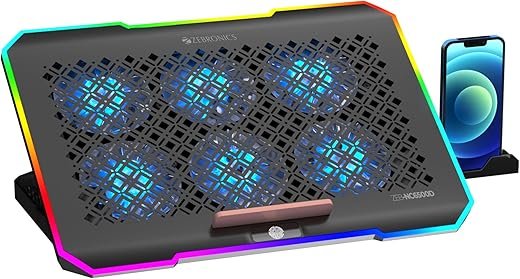
Noticeable airflow and ergonomic gains with RGB flair — great for everyday use, not for extreme gaming rigs.
Overheating can silently wreck performance and comfort — throttled frame rates, hot keys, and a laptop that feels like a heating pad. If your workflow or light gaming sessions leave your machine warm and uncomfortable, a well-designed cooling pad can make a real difference by improving airflow and ergonomics.
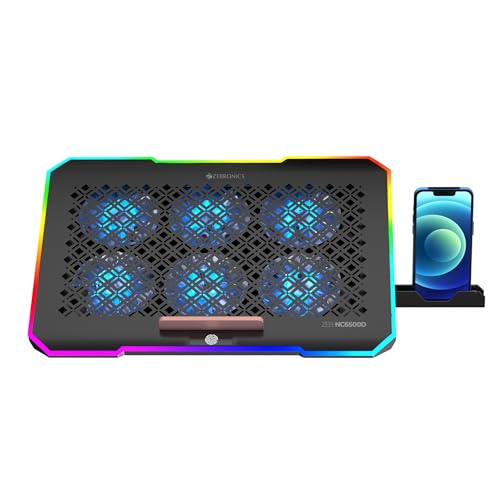
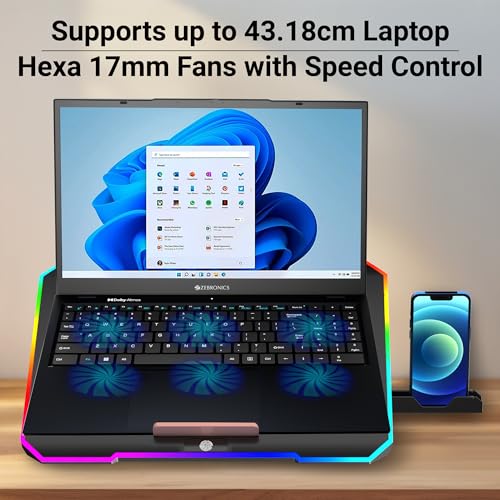
The ZEBRONICS NC6500D aims to tackle that with a six-fan layout, adjustable speed, RGB lighting, a five-step retractable stand, detachable mobile holder, and built-in USB ports — all while supporting up to 17″ laptops. In practice it delivers noticeable airflow and better viewing angles for office users, creators, and light-to-moderate gamers, but occasional quality-control hiccups and limited brute-force cooling mean it isn’t a cure-all for high-TDP gaming rigs.
ZEBRONICS NC6500D 17-inch RGB Cooling Pad

Delivers effective airflow and useful ergonomics for office users, content creators, and light-to-moderate gamers while adding RGB style to your desk. Occasional quality-control inconsistencies and limited brute-force cooling for very heavy gaming rigs prevent it from being a professional-grade cooler.
Overview
The Zebronics NC6500D is a budget-friendly laptop cooling pad designed to support laptops up to 17 inches (43.18 cm). It combines a hexagonal six-fan array with adjustable speed control, RGB LED lighting with tap control, a detachable mobile holder, a five-step retractable stand, and built-in USB ports — all in a compact black chassis. The product aims to strike a balance between cooling performance, adjustability, and visual appeal for users who want more than a simple passive pad without paying a premium price.
Key Design Elements
What’s in the Box
Build, Materials, and Practical Size
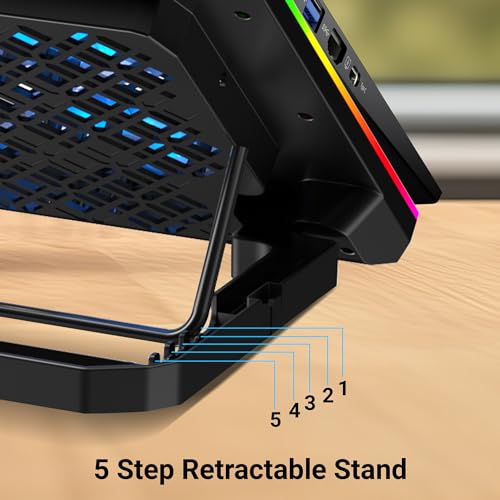
The NC6500D uses a mostly plastic construction with a metal mesh top surface over the fan areas. This keeps weight down (around 1.08 kg listed) and makes it easy to carry in a backpack. The five-angle stand mechanism uses retractable legs: each position locks into place but can feel a bit light when supporting heavier laptops (2.5 kg+).
The overall footprint is designed to accommodate up to 17-inch laptops, though users with wider chassis may find the support edges nearer the sides. Rubberized pads and anti-slip strips are applied where the laptop rests, helping stability during use.
Cooling Performance: How It Actually Behaves
Performance is one of the prime reasons to pick a multi-fan pad. The NC6500D’s six 70mm fans provide distributed airflow that helps lower surface temperatures, especially in laptops that experience high mid-load temperatures or thermal throttling.
A few practical notes:
Noise, Power, and Efficiency
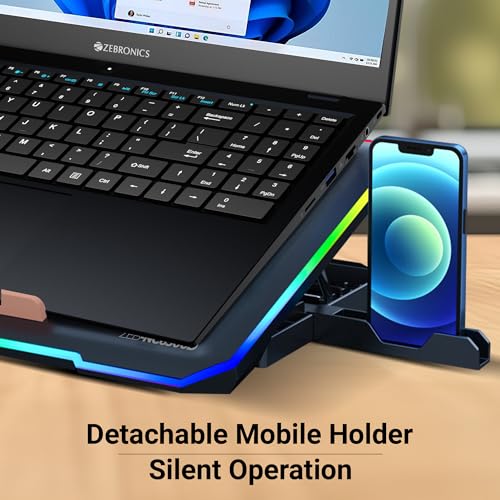
Zebronics markets the pad with reduced noise. In real-world use, the fans are relatively quiet at lower and medium speeds — suitable for office environments and streaming. At maximum fan speed you will notice more hum, but it still remains below the typical volume of laptop fans under full load.
The unit is USB-powered and draws power from your laptop or a power bank. One integrated USB acts as the power input and the pad includes an extra USB port for pass-through, which can be handy for a mouse or flash drive but may supply limited power for more demanding devices.
Controls, RGB, and Extras
Ergonomics and Adjustability
The pad’s five-step retractable stand helps reduce wrist strain and improves screen angle for video calls and long typing sessions. The angles range from low typing height to steeper viewing positions suitable for movie watching or casual gaming. The design keeps the laptop stable at most angles, though extremely heavy laptops may press the stand to its limit.
Connectivity and Compatibility
Below is a quick spec snapshot to help you match the pad to your laptop:
| Specification | Details |
|---|---|
| Supported Laptop Size | Up to 17-inch (43.18 cm) |
| Fans | Six 70mm hex fan layout |
| Power | USB-powered (integrated cable) |
| Additional Ports | Built-in USB pass-through port |
| Stand | 5-step retractable angles |
| Extras | RGB LED (tap control), detachable mobile holder |
Setup Tips and Practical Advice
Who Should Consider This Pad?
Not ideal for users with very heavy, high-TDP gaming laptops that demand extreme airflow or thicker, dual-fan cooling rigs.
Maintenance and Longevity
Final Thoughts
The NC6500D delivers a feature-rich package at an accessible price point: distributed six-fan cooling, RGB aesthetics, multi-angle ergonomics, and extra connectivity. It’s not flawless — build materials and occasional quality-control reports are valid concerns — but for everyday cooling needs, improved comfort, and attractive LED effects, it represents a compelling value.
FAQ
Yes — for most laptops, the six-fan design helps lower surface and internal temperatures, especially under light to moderate loads. Results vary by laptop design, ambient room temperature, and how well the laptop’s vents align with the fans. Expect bigger drops on thin, vented laptops than on heavy notebooks with closed intake paths.
The NC6500D uses a tap-control system for RGB, so you can cycle lighting modes directly on the pad without installing drivers. This makes it simple and portable across devices.
It supports laptops up to 17 inches in footprint, but stability depends on the laptop’s weight distribution. Very heavy gaming laptops (2.5 kg and above) may feel less stable and may reduce the effectiveness of the retractable stand.
Fans are reasonably quiet at low and medium speeds — suitable for office or study environments. At maximum fan speed noise increases noticeably but typically remains less intrusive than many laptop internal fans under full load.
The built-in USB pass-through is convenient for low-power peripherals like a mouse, keyboard, or flash drive. It may not provide enough current for power-hungry devices like some external drives or to charge high-draw phones fast.
Test the pad right after purchase and, if issues appear, contact the seller or manufacturer for warranty/ replacement. Users have reported occasional controller/RGB failures, so an early test makes returns or claims simpler.
Regularly wipe the mesh surface and use compressed air to blow dust from the fans. Avoid liquids and do not open the unit unless you’re experienced with electronics, as that may void the warranty.
Yes — since the pad is USB-powered, a power bank with a standard USB output can power it. Ensure the bank supports continuous output and that you monitor battery life during prolonged use.




A couple of nitpicks: plastic build feels a bit light and the fans are smaller than on some premium pads. Still, ergonomic tilt and the RGB are great for my setup. If you need hardcore cooling, look elsewhere; otherwise it’s a solid budget pick.
Would you recommend it for video editing? I do long renders but not gaming.
That’s in line with the expert verdict: effective airflow and ergonomics but not a pro-grade brute-force cooler. Good summary.
For long renders, it helps but won’t replace better ventilation or an external cooler. It should give modest temp drops though.
Same — for long CPU loads it’s helpful but don’t expect miraculous drops.
Short and sweet: works, looks good, cheap. Only complaint is occasional QC. Also the cable could be longer for some desk setups — I had to use an extension.
Noted — cable length is often overlooked. The review didn’t measure it, but user feedback like yours is helpful.
Pro tip: cable clips on the back of the desk keep it tidy and prevent tugging.
I moved my USB hub so the cable reaches better. A small extension solves it.
For 999 INR? Hard to complain. 👍
RGB looks cool, USB passthrough is handy, and the speed control lets you dial in the balance between noise and cooling. If you’re not pushing 100% CPU/GPU all day, it’s a steal.
One more pro tip: use it on a hard surface. Carpets block airflow and make it louder.
999 INR is basically a test-run — can’t beat it. 😄
Exactly — the review scores it well for that price bracket. The caveat is QC can be hit-or-miss, so keep an eye during unboxing and early use.
Totally — I put mine on a desk mat and it’s much steadier. Also, the USB ports saved me a slot for a dongle.
Thanks for the tips, folks. And yes, the built-in USB hub is handy for mice or flash drives.
Wish my local store had a display so I could see fan noise in person before buying.
Bought this last month for my 15-inch laptop — RGB looks nice and the six fans actually make a difference in daily use. Not a super-quiet unit but acceptable for office work. Good value for 999 INR.
Did you mount your laptop directly on it, or use a sleeve? Curious about airflow around keyboard.
Thanks for sharing, Laura. The review noted that it’s great for office users and content creators — the RGB is a bonus. If noise becomes an issue, try running it at a mid-speed setting.
Agreed. I keep mine at medium too. Fans are noticeable at max but performance is solid.
Nice write-up. A couple of things I wondered about: how stable is the five-step stand? And does the detachable phone holder stay put or fall off easily?
Also worth noting: the review found occasional QC inconsistencies, so if you get one with major wobble, consider an exchange.
Thanks — that’s exactly what I wanted to know. Might skip the holder then.
Good questions. The five-step stand felt sturdy during testing for normal typing angles, though it’s plastic — not metal. The mobile holder is convenient but can wobble if you shove a very heavy phone in it; for most phones it held fine.
I’ve been using it for two weeks — stand is fine for typing but if you push it hard it flexes. Phone holder is OK, I took it off after a day tbh.
For the price, these minor wobbles are expected. Just use a sticky pad or something if you really need the holder.
Does anyone know how the Zebronics NC6500D compares to a similar Cooler Master pad? Thinking of switching but unsure if RGB and extra fans are worth it.
Cooler Master > quieter and sturdier. Zebronics > cheaper and flashier. Depends on what you prioritize.
Cooler Master pads often prioritize build quality and quieter fan profiles; Zebronics focuses on value, RGB and six-fan layout. If you want quieter, more premium materials, Cooler Master may edge it — but price will be higher.